Integration · MODEL CONTEXT PROTOCOL
runekaagaard mcp redmine
A redmine MCP server covering close to 100% of redmines API
连接能力
runekaagaard mcp redmine 为 AI Agent 提供什么
来源目录未提供结构化功能列表,请在使用前阅读源仓库文档。
安全
MCP 收录不等于安全审核
MCP 服务器可能获得模型上下文、凭据、本地文件或调用外部系统的权限。连接 Agent 前,请检查代码、环境变量、网络行为、软件包来源与维护状态。
README
仓库文档
Status: Actively maintained and in daily use. Tested releases are published to PyPI with git tags, and issues and pull requests are triaged regularly.
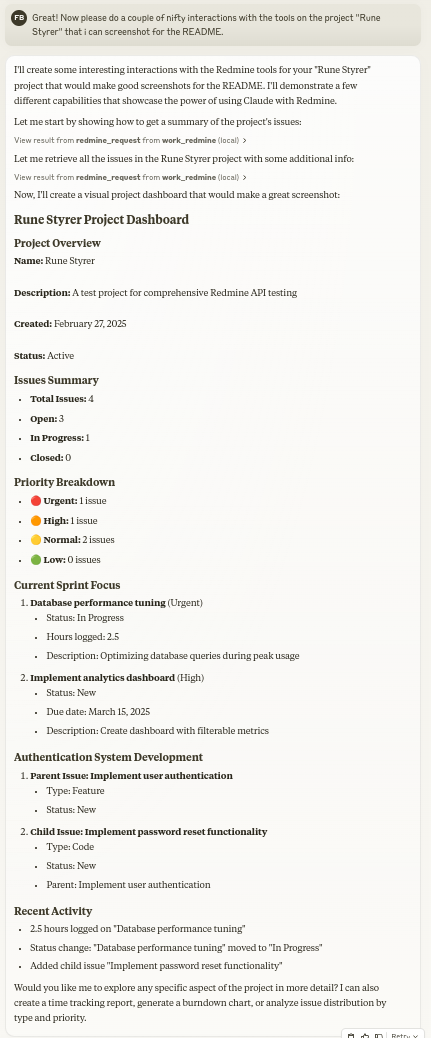
Let Claude be your Redmine assistant! MCP Redmine connects Claude Desktop to your Redmine instance, allowing it to:
- Search and browse projects and issues
- Create and update issues with full markdown support
- Upload and download file attachments
- Manage and track time entries
- Update issue statuses and fields
- Access comprehensive Redmine API functionality
Uses httpx for API requests and integrates with the Redmine OpenAPI specification for comprehensive API coverage.
Ensure you have uv installed.
uv --versionInstall uv if you haven't already.
-
Linux
curl -LsSf https://astral.sh/uv/install.sh | sh -
macOS
brew install uv
-
windows
powershell -ExecutionPolicy ByPass -c "irm https://astral.sh/uv/install.ps1 | iex"
Add to your claude_desktop_config.json:
  {
    "mcpServers": {
      "redmine": {
        "command": "uvx",
        "args": ["--from", "mcp-redmine==2026.09.10.084818",
                "--refresh-package", "mcp-redmine", "mcp-redmine"],
        "env": {
          "REDMINE_URL": "https://your-redmine-instance.example.com",
          "REDMINE_API_KEY": "your-api-key",
          "REDMINE_REQUEST_INSTRUCTIONS": "/path/to/instructions.md",
          "REDMINE_ALLOWED_DIRECTORIES": "/tmp,/home/user/uploads"
        }
      }
    }
}Ensure you have docker installed.
docker --versionPull the published image from GitHub Container Registry:
docker pull ghcr.io/runekaagaard/mcp-redmine:latestOr build the image yourself:
git clone git@github.com:runekaagaard/mcp-redmine.git
cd mcp-redmine
docker build -t ghcr.io/runekaagaard/mcp-redmine .
Add to your claude_desktop_config.json:
{
  "mcpServers": {
    "redmine": {
      "command": "docker",
      "args":  [
          "run",
          "-i",
          "--rm",
          "-e", "REDMINE_URL",
          "-e", "REDMINE_API_KEY",
          "-e", "REDMINE_REQUEST_INSTRUCTIONS",
          "-e", "REDMINE_ALLOWED_DIRECTORIES",
          "-v", "/path/to/instructions.md:/app/INSTRUCTIONS.md",
          "-v", "/path/to/uploads:/app/uploads",
          "ghcr.io/runekaagaard/mcp-redmine:latest"
      ],
      "env": {
        "REDMINE_URL": "https://your-redmine-instance.example.com",
        "REDMINE_API_KEY": "your-api-key",
        "REDMINE_REQUEST_INSTRUCTIONS": "/app/INSTRUCTIONS.md",
        "REDMINE_ALLOWED_DIRECTORIES": "/app/uploads"
      }
    }
  }
}MCP Redmine works with any MCP client (Claude Code, Cursor, IntelliJ-based IDEs, n8n, etc.) - point your client at the same command and environment variables as above, following your client's documentation for registering MCP servers.
By default the server speaks stdio. For clients or setups that connect over HTTP, start the server with one of the HTTP transports:
# Recommended HTTP transport (serves on http://HOST:PORT/mcp)
mcp-redmine --transport streamable-http --host 0.0.0.0 --port 8000

# Legacy SSE transport, for older clients (serves on http://HOST:PORT/sse)
mcp-redmine --transport sse --host 0.0.0.0 --port 8000| Variable | Required | Default | Description |
|---|---|---|---|
REDMINE_URL |
Yes | - | URL of your Redmine instance. Subpaths are supported (e.g., http://localhost/redmine/) |
REDMINE_API_KEY |
Yes | - | Your Redmine API key (see below for how to get it) |
REDMINE_REQUEST_INSTRUCTIONS |
No | - | Path to a file containing additional instructions for the redmine_request tool. I've found it works great to have the LLM generate that file after a session. (example1 example2) |
REDMINE_HEADERS |
No | (empty) | Custom HTTP headers to include in all requests. Format: "Header1: Value1, Header2: Value2". Useful for proxies that require additional authentication (e.g., X-Redmine-Username) |
REDMINE_RESPONSE_FORMAT |
No | yaml |
Response format: yaml or json. Controls how API responses are formatted |
REDMINE_ALLOWED_DIRECTORIES |
For upload/download | (disabled) | Required for file operations. Comma-separated list of directories where upload/download are allowed (e.g., /tmp,/home/user/uploads). Upload/download are disabled if not set for security |
REDMINE_DANGEROUSLY_ACCEPT_INVALID_CERTS |
No | (disabled) | Set to 1 to disable SSL certificate verification. Use only for self-signed certs in trusted environments |
REDMINE_CA_BUNDLE |
No | (system CAs) | Path to a custom CA certificate bundle (e.g. /path/to/ca.crt) for Redmine instances using a private certificate chain. Prefer this over disabling verification |
REDMINE_READ_ONLY |
No | (disabled) | Set to 1 to only allow GET requests. All writing operations (POST/PUT/DELETE, including uploads) are refused |
Note: When running via Docker, the
REDMINE_REQUEST_INSTRUCTIONSenvironment variable must point to a path inside the container, not a path on the host machine. Therefore, if you want to use a local file, you need to mount it into the container at the correct location.
Security Note: The
REDMINE_ALLOWED_DIRECTORIESsetting protects against path traversal attacks. Paths containing../are resolved before validation, ensuring files can only be accessed within the allowed directories.
- Log in to your Redmine instance
- Go to "My account" (typically found in the top-right menu)
- On the right side of the page, you should see "API access key"
- Click "Show" to view your existing key or "Generate" to create a new one
- Copy this key for use in your configuration
-
redmine_paths_list
- Return a list of available API paths from OpenAPI spec
- No input required
- Returns a YAML string containing a list of path templates:
- /issues.json - /projects.json - /time_entries.json ... -
redmine_paths_info
- Get full path information for given path templates
- Input:
path_templates(list of strings) - Returns YAML string containing API specifications for the requested paths:
/issues.json:
  get:
    operationId: getIssues
    parameters:
      - $ref: '#/components/parameters/format'
    ...
-
redmine_request
- Make a request to the Redmine API
- Inputs:
path(string): API endpoint path (e.g. '/issues.json')method(string, optional): HTTP method to use (default: 'get')data(object, optional): Dictionary for request body (for POST/PUT)params(object, optional): Dictionary for query parameters
- Returns YAML string containing response status code, body and error message:
status_code: 200
body:
  issues:
    - id: 1
      subject: "Fix login page"
      ...
error: ""
-
redmine_upload
- Upload a file to Redmine and get a token for attachment
- Requires
REDMINE_ALLOWED_DIRECTORIESto be set - Inputs:
file_path(string): Fully qualified path to the file to upload (must be within allowed directories)description(string, optional): Optional description for the file
- Returns YAML string with the same format as redmine_request, including upload token:
status_code: 201
body:
  upload:
    id: 7
    token: "7.ed32257a2ab0f7526c0d72c32994c58b131bb2c0775f7aa84aae01ea8397ea54"
error: ""
-
redmine_attachment_image
- Fetch an image attachment (e.g. an inline screenshot referenced as
!screenshot.png!in an issue description) and return it as viewable image content, letting the LLM actually see it - Input:
attachment_id(integer) - Returns image content on success (max 5 MB, images only), or a YAML error string on failure
- Fetch an image attachment (e.g. an inline screenshot referenced as
-
redmine_download
- Download an attachment from Redmine and save it to a local file
- Requires
REDMINE_ALLOWED_DIRECTORIESto be set - Inputs:
attachment_id(integer): The ID of the attachment to downloadsave_path(string): Fully qualified file path (not directory) where the file should be saved (must be within allowed directories)filename(string, optional): Optional filename for the Redmine download URL (determined automatically from attachment metadata if not provided)
- Returns YAML string with download results:
status_code: 200
body:
  saved_to: "/path/to/downloaded/file.pdf"
  filename: "file.pdf"
error: ""
Let's create a new bug report in the "Website" project:

1. Title: "Homepage not loading on mobile devices"
2. Description: "When accessing the homepage from iOS or Android devices, the loading spinner appears but the content never loads. This issue started after the last deployment."
3. Priority: High
4. Assign to: John Smith
Can you find all high priority issues in the "Website" project that are currently unassigned?
Please mark issue #123 as "In Progress" and add a comment: "I've started working on this issue. Expect it to be completed by Friday."
Log 3.5 hours against issue #456 for "Implementing user authentication" done today.
MCP Redmine is listed in the following MCP directory sites and repositories:
First clone the github repository and install the dependencies:
git clone git@github.com:runekaagaard/mcp-redmine.git
cd mcp-redmine
uv sync
Then set this in claude_desktop_config.json:
...
"command": "uv",
"args": ["run", "--directory", "/path/to/mcp-redmine", "-m", "mcp_redmine.server"],
...
- MCP Alchemy - Connect Claude Desktop to databases for exploring schema and running SQL.
- MCP Notmuch Sendmail - Email assistant for Claude Desktop using notmuch.
- MCP Show-on-Kindle - Copy a file to a Kindle running KOReader and open it on screen.
- Diffpilot - Multi-column git diff viewer with file grouping and tagging.
- Claude Local Files - Access local files in Claude Desktop artifacts.
Contributions are warmly welcomed! Whether it's bug reports, feature requests, documentation improvements, or code contributions - all input is valuable. Feel free to:
- Open an issue to report bugs or suggest features
- Submit pull requests with improvements
- Enhance documentation or share your usage examples
- Ask questions and share your experiences
The goal is to make Redmine project management with Claude even better, and your insights and contributions help achieve that.
This project builds on the excellent work of others:
- httpx - For handling HTTP requests
- Redmine OpenAPI Specification - For the comprehensive API specification
- Redmine - The flexible project management web application
Mozilla Public License Version 2.0
社区